Enabling notifications for your shared group
Print
Created by: Erin Hanson
Modified on: Sat, 1 Dec, 2018 at 1:21 AM
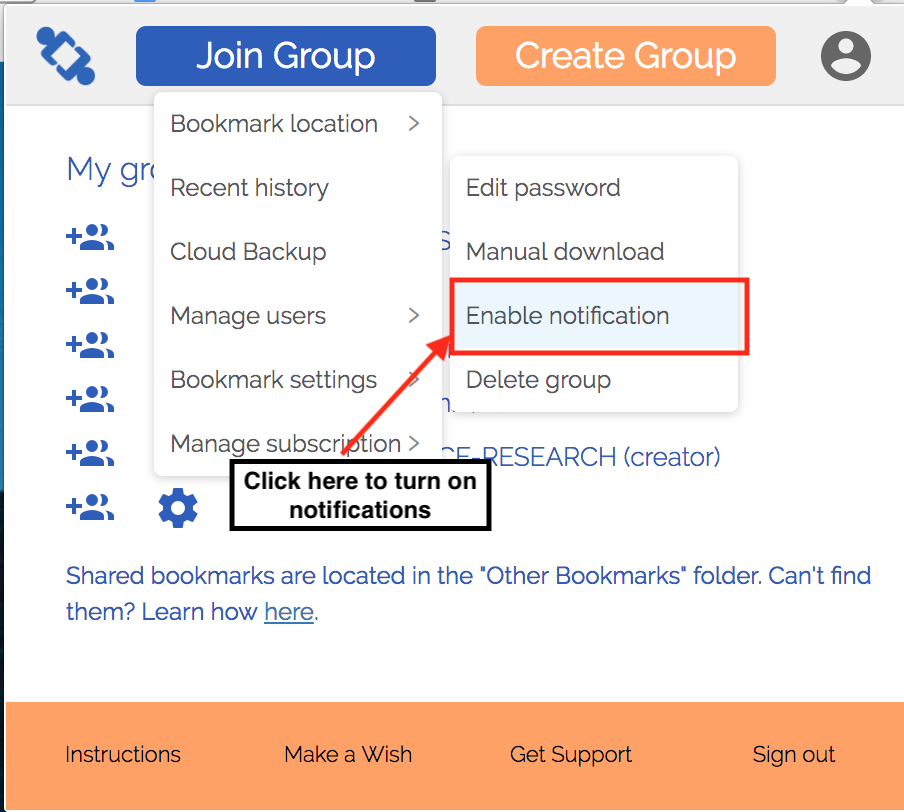
By enabling notifications, you will receive a browser notification whenever new bookmarks are added to your shared group. These notifications run every minute, so you don't get too many notifications.- Click on the settings icon next to your group
- Click on "Bookmark settings"
- Click "Enable notification"
Erin is the author of this solution article.
Did you find it helpful?
Yes
No
Send feedback Sorry we couldn't be helpful. Help us improve this article with your feedback.
